
Fiber optic cable repair starts long before anyone opens a splice enclosure. When a business fiber link goes down, the fastest path back is a calm, ordered check that rules out the simple causes first, finds the real damage and fixes it once.
This guide walks through that order: how to tell the fiber is the problem, what to check before calling for a splice, how fiber optic cable repair actually works, how the repair is tested and how to make the next cut less likely. It applies to backbone links inside a building and to fiber between buildings on the same property.
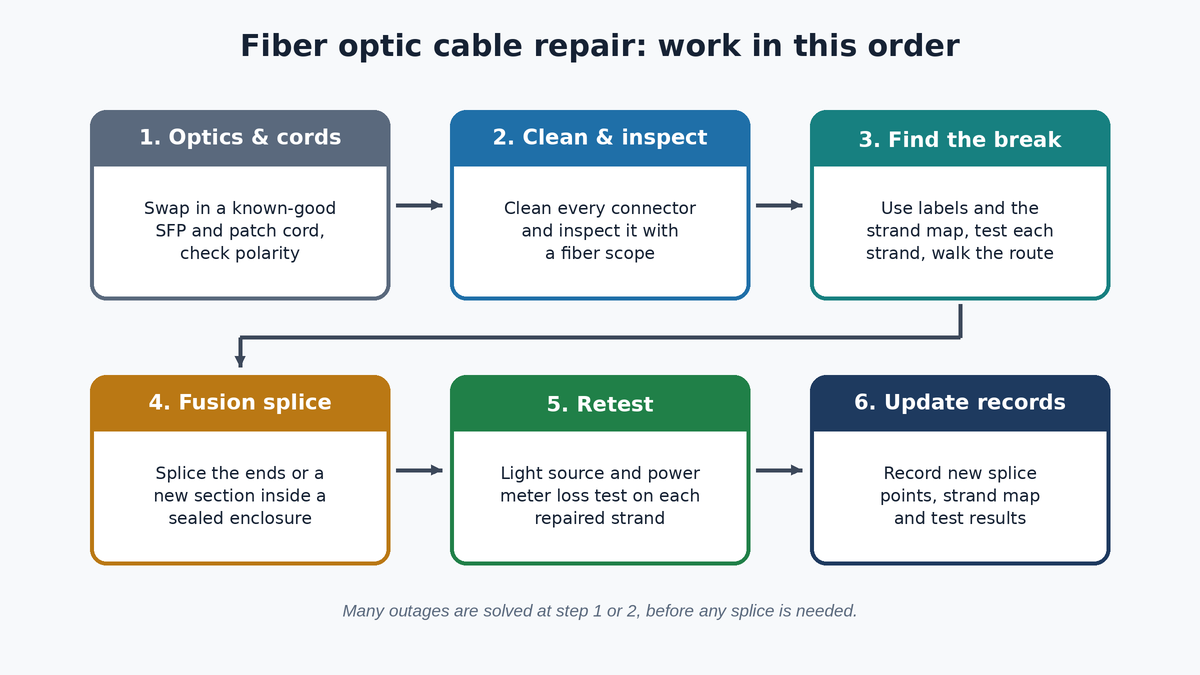
Signs the Fiber Is the Problem
Every fiber optic cable repair begins by confirming the fiber is really at fault. A fiber link usually connects two switches, such as the main equipment room and a wiring closet, or two buildings. When it fails, the symptom is often a whole area going dark at once: every phone, register, access point and computer behind one closet loses the network, while the rest of the site keeps working.
Look at the link lights on the fiber ports or SFP modules at both ends. A dark link light on both switches points toward the fiber path or the optics. Many managed switches can also report the light level an optic is receiving. A reading at or near zero on one end tells you light is not arriving from the other side.
The pattern matters too. The Fiber Optic Association’s restoration guide notes that when every link in a cable fails together, a cut or break in the cable is likely. When only one link of many is down, the electronics, a patch cord or one or two damaged fibers are the more likely cause.
Check the Easy Things First
Many “fiber is down” calls end without any fiber optic cable repair at all. Before anyone assumes the cable is cut, rule out the parts that are easiest to check and most often disturbed.
- Power and equipment. Confirm both switches have power and the ports are enabled. A tripped circuit or a switch that rebooted with a changed setting can look exactly like a cut.
- Recent work. Ask whether anyone moved equipment, added a patch cord or worked in a closet or ceiling. The FOA guide lists moves, adds and changes as a common cause of outages.
- Optics. An SFP module can fail on its own. Swapping in a known-good optic of the same type, wavelength and speed is a quick test. Our guide to SFP modules and fiber uplinks explains how to match them.
- Patch cords. Patch cords get pinched, kinked and pulled. The FOA treats them as replaceable rather than repairable, so keep a few spares of the right type on hand.
- Polarity. Duplex fiber has to run transmit to receive. A patch cord swapped during other work can stop a link even though nothing is broken.
Clean and inspect the connectors
Fiber has almost no tolerance for dirt. The FOA’s page on cleaning fiber optic connections notes that airborne dust is close to the size of a single-mode fiber core. Connectors should be cleaned with proper fiber cleaning supplies and inspected under a fiber scope before they are mated, and dust caps belong on any open port.
Dirty connectors more often cause high loss or a flaky link than a sudden total outage, but any connector that was unplugged during troubleshooting should be cleaned and inspected before it goes back in.
Finding the Damage Without Guesswork
If the optics, patch cords and connectors check out, the problem is in the cable plant itself.
This is where good records save hours on a fiber optic cable repair. Labels on each enclosure, a strand map showing which fiber goes to which port, and the loss results from the original install tell a technician exactly which strands to test and what normal looks like. Our guide on how to label network cables covers the labeling side.
Testing each strand with a light source and power meter shows which fibers are dead and which still pass light. If every strand in the cable is out, the cable is likely cut or crushed somewhere along the route. If only a few are out, the damage is more often at a termination or inside an enclosure, and moving the link to a tested spare strand can restore service while the repair is planned.
Walk the route
Testing tells you which fibers are bad. Finding where they broke usually means walking the path, and that search is often the longest part of a fiber optic cable repair. Look for fresh digging, fence posts, sign installs or boring near an underground route. Indoors, check ceilings, risers and trays where other trades have been working, plus the enclosures at each end for a fiber pulled out of a tray.
When a link passes through an intermediate patch panel or splice point, testing each segment separately narrows the search to one section of cable, so the fiber optic cable repair can be planned for that section alone. A route map and as-built drawings make this much faster than lifting ceiling tiles at random.
How Fiber Optic Cable Repair Works
Once the damage is found, there are three common ways to fix it. The right one depends on how long the cable is, how much slack is available and how badly it is damaged.
Splice the cable back together
If the cable has a service loop nearby, the damaged section can be cut out and the two good ends pulled together. Each fiber is then fusion spliced and the splices are protected in trays inside a sealed splice enclosure. The FOA guide notes that extra length is needed on each end to strip the cable and dress the fibers, which is one reason service loops matter.
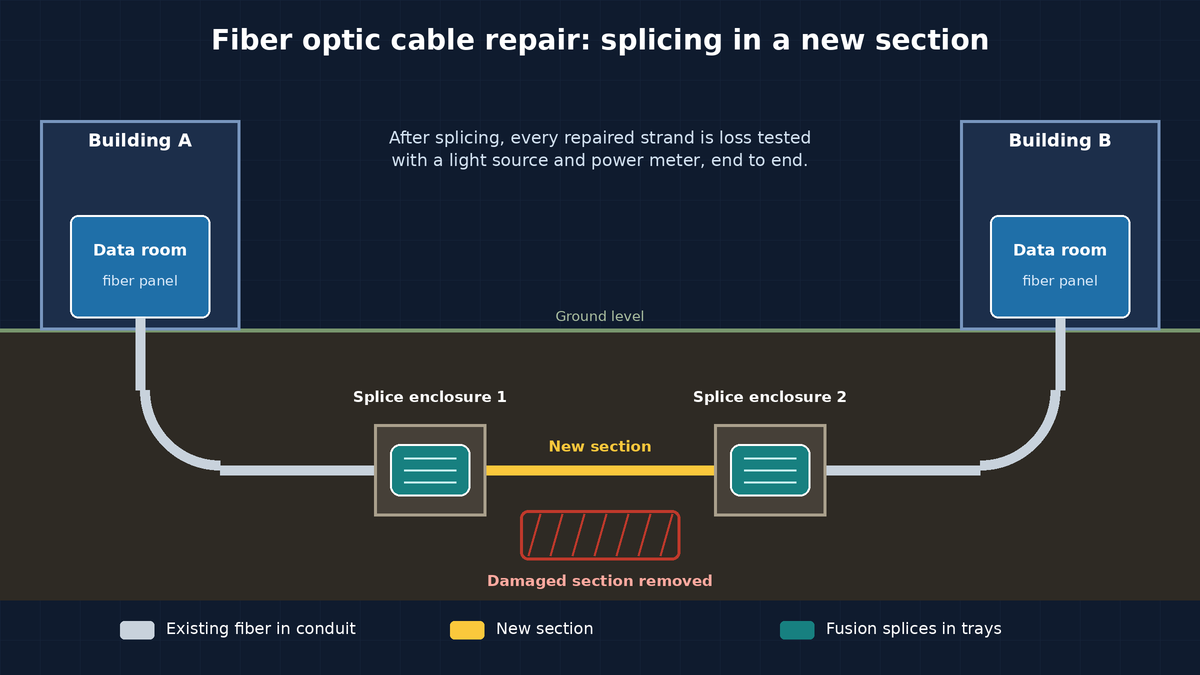
Splice in a new section
When there is not enough slack, a new piece of matching cable is spliced in to bridge the gap. That means two splice points, each in its own enclosure or at an existing panel.
A well-made fusion splice adds very little loss. One test equipment maker’s splicing guide puts a good one under 0.1 dB. The Fiber Optic Association’s loss estimates use 0.15 dB for a singlemode fusion splice, and the cabling standard allows up to 0.3 dB per splice.
Replace or re-terminate
For short runs inside a building, replacing the cable can be simpler than a fiber optic cable repair. If the break is right at one end, the fiber can often be re-terminated by splicing on new pigtails in the enclosure. Our comparison of fusion splicing vs pre-terminated fiber explains why splicing is often the practical choice for repairs, where lengths and pathways are already fixed.
The fiber type has to match the original: single-mode to single-mode and multimode to the same grade. If you are not sure what is installed, our guide to singlemode vs multimode fiber explains how to tell them apart.
Testing After a Fiber Optic Cable Repair
A link that lights up is not the same as a link that passes a test. After any fiber optic cable repair, each repaired strand should get an insertion loss test with a light source and power meter, at the right wavelengths for the fiber type. The result is compared to a loss budget for that link, built from its length, connectors and splices.
If original test results exist, compare the new readings to them. A repaired strand should come in close to where it was, plus the small added loss of the new splices. Our guide to fiber optic loss testing explains reference methods, wavelengths and how to read the report.
Update the records
The FOA guide recommends updating the documentation after every restoration: new splice points and enclosures, any fibers that are no longer usable, and the new test results. Skipping this step means the next technician works from a map that no longer matches the building.
Preventing the Next Cut
Most of what makes a fiber optic cable repair quick is decided before the outage. A few habits help:
- Locate before digging. 811 is the free national before-you-dig service, and requests go in a few business days ahead of any digging. Keep in mind that utility locators generally do not mark privately owned lines. Miss Utility points owners to a private locating company for those.
- Keep route records. A drawing or map of where your own fiber runs between buildings lets you warn contractors before they dig. Our guide to running fiber between buildings covers routes and conduit.
- Plan spare strands and slack. Spare tested strands and service loops turn some outages into a patch cord move.
- Protect the ends. Closed or locked enclosures and fiber kept in its own pathway reduce accidental damage in busy closets, including the long runs in warehouse network cabling.
FAQ: Fiber Optic Cable Repair
Can a cut fiber optic cable be repaired, or does it have to be replaced?
Most cut cables can be repaired by fusion splicing, either by joining the two ends if there is enough slack or by splicing in a new section. Short indoor runs are sometimes simpler to replace. The choice depends on length, slack and how much of the cable is damaged.
Is a spliced fiber as good as the original?
A properly made fusion splice adds very little loss, usually well within the link’s loss budget. The way to know is to test the repaired strand with a light source and power meter and compare the result to the budget and to the original readings.
How long does fiber optic cable repair take?
It depends on where the damage is, how hard it is to reach, the fiber count, whether a new section is needed and whether digging or permits are involved. Good labels, strand maps and route records shorten the search, which is often the longest part.
Should we repair all the strands or just the ones in use?
Repairing and testing every strand in the damaged section is usually the better choice during a fiber optic cable repair. Spare strands are your fastest fallback the next time something goes wrong, and leaving them broken removes that option.
What should we have ready when we call for a fiber optic cable repair?
The site address, which areas lost service and when, anything that changed recently, and any labels, strand maps or old test results you have. Photos of the enclosures at each end help too.
Get a Fiber Link Back Up With Chain
Chain repairs and installs business fiber across the Mid-Atlantic, with fusion splicing done in-house and every repaired strand loss tested with a light source and power meter. Our fiber optic repair page explains how we find the damage, splice it and retest the link. We also handle the structured cabling and network equipment on each end. See our fiber optic services and service and repair pages, check our service area in MD, VA, DC, DE, PA and NJ, or contact us to schedule a repair.