
Warehouse network cabling has a problem office cabling rarely faces: distance. A distribution building can be several hundred feet from end to end, and copper Ethernet stops at 100 meters. Scanners, label printers, dock stations, access points and cameras are spread across the whole floor, and the racks, forklifts and high ceilings make every cable run harder. The answer in most buildings is a fiber backbone that ties several network closets together, with copper and WiFi handling the last stretch. This guide walks through how to plan it.
Why Copper Alone Does Not Reach
Under TIA-568, a copper Ethernet channel is limited to 100 meters (about 328 feet), and the permanent link in the wall or ceiling to 90 meters, leaving room for patch cords. That limit is the same for Cat6 and Cat6A. In a large building, a single network room near the office cannot reach the far wall, the back docks or the mezzanine with copper.
Speed adds another limit. Cat6 supports 10 Gb/s only up to 55 meters, while Cat6A supports 10 Gb/s across the full 100 meters. For links between switches, which carry the traffic of everything behind them, fiber is the better choice. Multimode OM4 fiber carries 10 Gb/s for about 400 meters, and single-mode fiber reaches kilometers. Our guide to Cat6 vs fiber backbones explains the tradeoffs in more detail.
The Basic Layout: MDF, IDFs and a Fiber Backbone
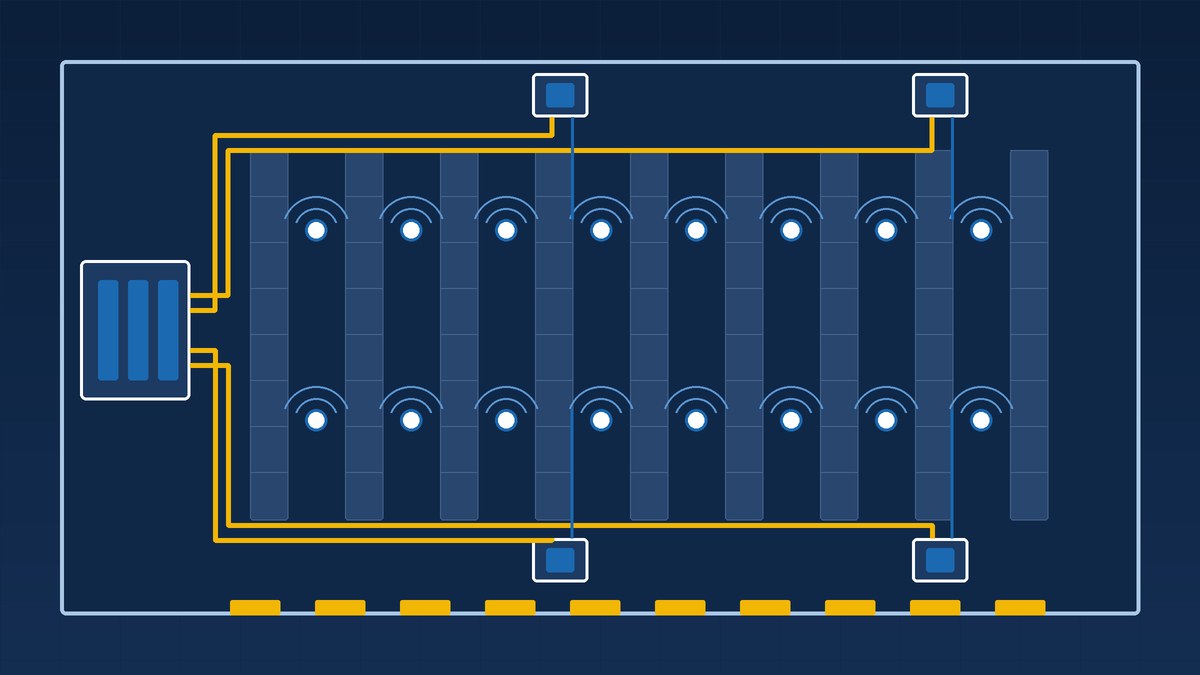
Most warehouses use a hierarchical star, the layout TIA-568 is built around. There is one main distribution frame (MDF), usually near the office or where the internet service enters, and several intermediate distribution frames (IDFs) spread across the floor. Each IDF gets its own fiber run back to the MDF. Copper cabling then runs from each IDF to the devices within its reach.
Placing the IDFs
Start with the 90-meter limit and work backward. Every device location, including the farthest dock door and the highest access point, should be within 90 meters of cable route from an IDF. Cable route is longer than straight-line distance, because it climbs to the ceiling, follows the tray and drops down again. Plan with the route, not the floor plan.
Good IDF spots are away from forklift traffic, protected from dust and temperature swings, and close to power. In many warehouses that means a lockable enclosure on a wall or column, or a small room off the floor, with ventilation for the switches inside. Our network closet setup guide covers power, cooling and layout.
Home runs, not daisy chains
Each IDF should have its own fiber run back to the MDF. Chaining closets together, IDF to IDF, means a single failure in the middle takes down everything past it. Home runs keep each area independent and make troubleshooting simpler. If uptime is critical, a second fiber path to key IDFs adds redundancy. See our network redundancy planning guide.
Choosing the Fiber
Inside one building, multimode OM4 is common for shorter backbone runs, and single-mode OS2 is common for longer runs and anything that leaves the building. Single-mode has far more distance headroom and is the usual choice for runs to a guard shack, a second building or a yard office. Picking one type for the whole site can simplify spares and optics. Our singlemode vs multimode guide covers the decision.
Plan more strands than you need on day one. Pulling an extra cable later through a full ceiling, over racking that is now stocked, costs far more than the added strands at install time. Spare strands also give you a backup if one is damaged.
Fiber can be fusion spliced to pigtails in the field or ordered pre-terminated. In warehouses, where routes are long and lengths often change once lifts are in the air, field splicing is common. Read more in fusion splicing vs pre-terminated fiber.
Pathways in a High-Bay Building
In warehouse network cabling, how the cable is supported matters as much as the cable itself.
- Use a main pathway. Cable tray or a straight line of J-hooks along the building grid keeps runs organized and easy to add to.
- Do not use the sprinkler system. NFPA 13 does not allow sprinkler piping or hangers to support other systems, including cable. Support cable from the building structure.
- Protect drops near traffic. Where cable comes down a column to a scanner station, printer or dock door, run it in conduit or a protective channel up to a safe height. Forklifts and pallet jacks will find exposed cable.
- Plan around racking. Keep pathways clear of rack uprights and the space above racks that lifts need. Coordinate with the racking layout before the cable goes in.
- Use the right jacket. Cable in air-handling spaces needs the jacket rating your local code requires. Outdoor and underground runs need cable rated for those conditions.
WiFi for Scanners and Mobile Devices
Handheld scanners, vehicle-mounted computers and mobile printers depend on WiFi that covers every aisle and hands off cleanly as workers move. Warehouses are hard on WiFi. Tall metal racks and stocked product block and reflect signal, and coverage can change as inventory changes.
- Survey with the racks in place. A survey in an empty building will not match conditions once racks are full. Plan with the final layout and verify after stocking.
- Place access points for aisles. Mounting position and antenna type should suit long, narrow aisles. Directional antennas aimed down aisles are one common approach.
- Cable for the future. TIA’s guidance for access point cabling, TSB-162-B, recommends Category 6A and at least two cables to each access point location.
- Plan PoE. Access points and many cameras run on Power over Ethernet. TIA TSB-184-A recommends Category 6A or higher for new installs that carry PoE, and switches in each IDF must have enough PoE budget for everything they feed. Our PoE vs non-PoE switches guide explains how to size it.
For more on placement and density, see wireless access point placement and WiFi capacity planning.
Docks, Yards and Outbuildings
Dock doors are busy, exposed and often the edge of WiFi coverage. Wired drops at dock stations, protected from equipment, are often more reliable than WiFi alone. Guard shacks, yard offices and second buildings are best connected by an outdoor-rated fiber run rather than a long copper cable or a wireless bridge, because fiber does not carry ground potential differences between buildings. Our guide to fiber between buildings covers the route and cable options.
Cameras ride on the same backbone. Indoors, plan for cameras of at least 4MP class. At docks, yards and perimeters, use higher-resolution exterior models. Our warehouse camera deployment plan covers placement and storage. Plan their PoE and switch ports into each IDF from the start.
Installing Around Operations
Most warehouses cannot stop for cabling. Work in aisles often has to happen off-shift, with lifts scheduled around picking and loading. A phased plan, area by area, with the backbone first, keeps disruption low. Before work starts, agree on lift access, safety rules near equipment, and when each area will be handed over.
Labeling and Testing Warehouse Network Cabling
A large building with several IDFs is only manageable if everything is labeled and recorded. Every fiber strand, patch panel port and drop should have a label that matches the drawings. A TIA-606 style scheme works well. See how to label network cables and how to document network ports.
At handoff you should receive:
- Loss test results for every fiber strand. See our fiber optic loss testing guide for how to read them.
- Certification test results for every copper drop
- As-built drawings showing IDF locations, pathways and drop locations
- A port map for each IDF
FAQ: Warehouse Network Cabling
How far can Ethernet cable run in a warehouse?
A copper Ethernet channel is limited to 100 meters, or about 328 feet, including patch cords. The permanent cable run is limited to 90 meters. Anything farther needs a closer IDF, connected back by fiber.
How many IDFs does a warehouse need?
It depends on the building’s size and layout. Place IDFs so every device location is within 90 meters of cable route, measured along the actual pathway, including the climb to the ceiling and the drop back down.
Should warehouse access points use Cat6 or Cat6A?
For new installs, Cat6A. TIA’s access point cabling guidance recommends Category 6A with at least two cables per access point location, and TIA’s PoE guidance recommends Category 6A or higher for new installs carrying power.
Is single-mode or multimode better for a warehouse backbone?
Both work. Multimode OM4 is common for shorter in-building runs. Single-mode OS2 suits long runs and links to other buildings. Many sites standardize on single-mode for its distance headroom.
Can cabling be installed while the warehouse is running?
Usually, yes, with planning. Work is phased by area and scheduled around shifts and equipment, with the backbone installed first so each area can be cut over without a full shutdown.
Plan Your Warehouse Network with Chain
Chain designs and installs warehouse networks across the Mid-Atlantic, from the fiber backbone and IDFs to the copper drops and the WiFi your scanners depend on. We fusion splice in-house, loss test every fiber strand, certification test our copper cabling, and we are licensed and insured. Explore our fiber optic services, structured cabling and networking and WiFi work, and check our service area in Maryland, Virginia, DC, Delaware, Pennsylvania and New Jersey. To start planning your building, contact us.