
SFP modules are the small plug-in parts that let a switch talk over fiber. Fiber in the walls doesn’t do anything until the switches on each end can send and receive light over it, and that job falls to these transceivers.
They’re also where a lot of fiber projects stall: the cable is installed and tested, the switches are racked, and the link won’t come up because the optics don’t match the fiber, each other, or the switch.
This guide explains what SFP modules do, how to read their names, and how to match them to the fiber between your network closets or buildings.
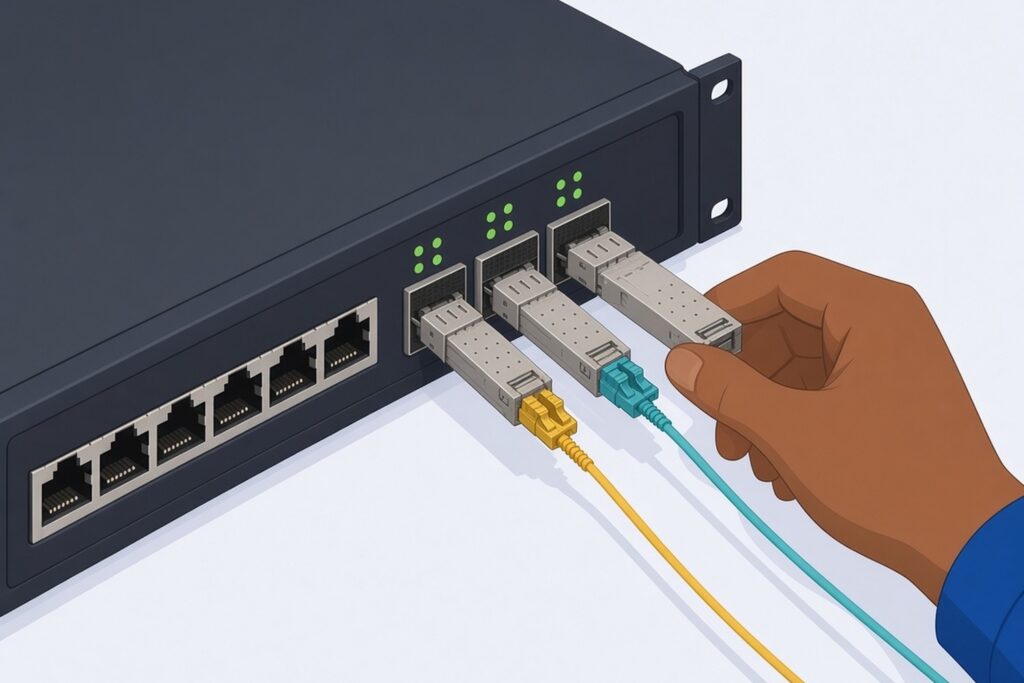
What SFP Modules Do
SFP stands for small form-factor pluggable. A module slides into a port on a switch, firewall or media converter and turns the switch’s electrical signal into light on the fiber, and back again. Most fiber SFP modules use a duplex LC connector: one strand transmits and the other receives.
There are a few versions you’ll see on switch spec sheets:
- SFP ports usually run at 1 Gbps.
- SFP+ ports run at 10 Gbps.
- SFP28 ports run at 25 Gbps.
Some SFP+ ports also accept 1 Gbps SFPs, and some don’t, so check the switch documentation. There are also copper SFP modules (1000BASE-T) with an RJ45 jack for short Ethernet runs of up to 100 meters.
If you want the background on how fiber transmitters and receivers work, the Fiber Optic Association has a clear, vendor-neutral page on fiber optic transmitters and receivers.
Reading the Part Name on SFP Modules
The standard name printed on SFP modules tells you most of what you need. Take 1000BASE-LX as an example. The 1000 is the speed in Mbps.
The letter after BASE- points to the wavelength: S for short (850 nm, used with multimode fiber) and L for long (1310 nm, used with single-mode fiber). At 10 Gbps, E is for extended (10GBASE-ER, 1550 nm, about 40 km).
Long-reach 1 Gbps SFP modules are often sold as ZX, which is a vendor label rather than an IEEE standard. The common ones in business networks:
- 1000BASE-SX: 1 Gbps over multimode at 850 nm. The standard reach is about 220 to 275 meters on older OM1 fiber and 550 meters on OM2 and better.
- 1000BASE-LX: 1 Gbps over single-mode at 1310 nm. The IEEE standard specifies 5 km, but most modules sold as LX (or LX10) are rated to about 10 km.
- 10GBASE-SR: 10 Gbps over multimode at 850 nm. Reach depends heavily on the multimode grade: about 300 meters on OM3, 400 meters on OM4, and only 33 to 82 meters on older OM1 and OM2.
- 10GBASE-LR: 10 Gbps over single-mode at 1310 nm, typically rated to about 10 km.
Always check the reach on the specific module’s datasheet against the actual length of your link.
Matching SFP Modules to Your Fiber and Switch
For a fiber link to come up, a few things have to line up.
Optic to fiber
Multimode optics (SX, SR) go on multimode fiber. Single-mode optics (LX, LR) go on single-mode fiber. Mixing them either won’t link or will give you an unreliable link.
If you don’t know what’s in the wall, look at the cable jacket marking or the test results from the installer. Patch cord colors are a helpful clue (yellow is common for single-mode, aqua for OM3 and OM4 multimode, and some OM4 is violet), but labels and records are more reliable than color. Our post on singlemode vs multimode fiber explains the difference.
Optic to optic
Both ends of the link need SFP modules of the same standard and wavelength. An SX on one end and an LX on the other will not link. Neither will a 1 Gbps optic facing a 10 Gbps optic.
Most optics run at one fixed speed, and changing the port speed setting won’t fix that, with the exception of the few modules sold as dual-rate. Many switch makers recommend using the same optic model on both ends to avoid compatibility issues.
Optic to switch
Many switches only accept SFP modules that are coded for that brand, or warn when they see an unrecognized one. Check the switch maker’s supported optics list before buying. A module that works perfectly in one brand of switch can be rejected by another.
Patch cords
The patch cords from the patch panel to the switch must match the fiber type and have the right connectors on each end, usually LC to LC. If the panel uses a different connector style, you’ll need the matching hybrid cord.
BiDi Optics for Single-Strand Links
Sometimes only one strand is available, such as an older cable with most strands already used. Bidirectional (BiDi) SFP modules send and receive on one strand using two different wavelengths.
Common pairs use 1310 and 1550 nm at 1 Gbps, or 1270 and 1330 nm at 10 Gbps. They come in matched pairs, often labeled U and D (upstream and downstream) or by their transmit wavelength, and one of each must be used. Two U modules facing each other will not link.
Distance, Loss and Overload
Every optic has a power budget: how much light it puts out and how weak a signal it can still read. The installed fiber has its own loss, measured during testing with a light source and power meter. The link works when the fiber’s loss fits comfortably within the optic’s budget. The FOA’s page on power budgets and loss budgets walks through the difference.
Too much light can also be a problem. Long-reach single-mode optics are built for runs of many kilometers. On a short run they can overload the receiver on the other end, which shows up in the module’s datasheet as a receiver overload limit. If a long-reach optic is truly needed on a short link, an inline attenuator brings the power down into range.
For most building and campus links, standard 10 km SFP modules are the right choice, not 40 km or 80 km ones.
When a Fiber Uplink Won’t Come Up
Work through the simple causes first:
- Confirm both SFP modules are the same standard and wavelength, and match the fiber type.
- Check that the switch recognizes the module and the port is enabled at the right speed.
- Check polarity. Transmit on one end has to reach receive on the other. Swapping the two connectors at one end is a quick test. The FOA’s guide to fiber link polarity explains why this goes wrong.
- Clean and inspect the connectors with a fiber scope. Dust on a fiber end face is a common cause of high loss. Never look into a fiber end or an SFP port with your eye, because the laser light is invisible.
- Look at the optic’s diagnostic readings in the switch (often called DOM or DDM), if it supports them, for transmit and receive power.
- Have the strand tested with a light source and power meter and compare the result to the original test records.
If the link worked before and stopped, look for physical damage first: a pinched patch cord, a panel that was moved, or recent construction along the cable route.
Plan Optics With the Network, Not After It
When you’re designing a fiber backbone, choose the switch ports and SFP modules at the same time as the cable. A camera-heavy site or a building with many access points may justify 10 Gbps uplinks from day one, and single-mode fiber lets you move to faster optics later without recabling.
Our Cat6 vs fiber backbone post covers when fiber is worth it inside a building.
When to Call a Contractor
Bring in a contractor when:
- You’re installing new fiber and need it designed around specific switches and optics.
- You don’t know what type of fiber is in your building, or there are no test records.
- A fiber uplink is down or dropping and the basic checks above didn’t fix it.
- You’re upgrading switches and need to know whether the existing fiber supports faster optics.
Chain installs and fusion splices fiber, tests each strand with a light source and power meter, and configures the switches on both ends, so the cable and the network are handled by one team. Our service and maintenance team also troubleshoots existing links.
SFP Modules FAQ
Do both ends of a link need the exact same module?
Not necessarily. The two ends only need to share the same standard, wavelength and speed. BiDi optics are the exception, since they need a matched U and D pair. What matters more is that each module is accepted by the switch it’s plugged into, so check each switch’s supported optics list. Using the same model on both ends is still the simplest way to avoid surprises.
What’s the difference between SFP and SFP+?
They’re the same physical size, but SFP is typically 1 Gbps and SFP+ is 10 Gbps. An SFP+ port may accept a 1 Gbps SFP, while a 1 Gbps SFP port usually won’t run a 10 Gbps module at all. Check the switch documentation for the speeds each port supports.
Are SFP modules hot-swappable?
Yes. They’re designed to be inserted and removed while the switch is powered on. The link on that port will drop while you swap it, so plan the change for a quiet time if the port is an uplink.
Do I need to replace my fiber to go from 1 Gbps to 10 Gbps?
Not always. Single-mode fiber usually supports 10 Gbps over building and campus distances with the right optics. Older multimode fiber (OM1 or OM2) reaches only about 33 to 82 meters at 10 Gbps with standard SR optics, so check the fiber type and the test results before you buy new SFP modules.
How do I know if a module is failing?
Signs include a link that flaps up and down, rising error counters on the port, or transmit and receive power readings that drift outside the datasheet range. Swapping in a known-good module and cleaning the connectors are quick ways to narrow it down.
Getting Started
Whether you’re running new fiber or bringing an existing link back up, Chain works with businesses across Maryland and the rest of our Mid-Atlantic service area. See our structured cabling and fiber services and business networking and WiFi, or contact us to plan your next upgrade.