
Running fiber between buildings is usually the cleanest way to bring a second building onto your network. Maybe it’s a warehouse behind the office, a detached shop, a new wing across the parking lot, or a guard booth at the gate. Staff there need the same network, phones, cameras and WiFi as the main building, and a fiber link gets it there without the distance and lightning problems of copper.
This guide walks through the decisions that go into a fiber link between buildings: why fiber is the default choice, how the route gets picked, what kind of cable belongs outdoors, how the ends get terminated, and how you know the link is good when the crew leaves.
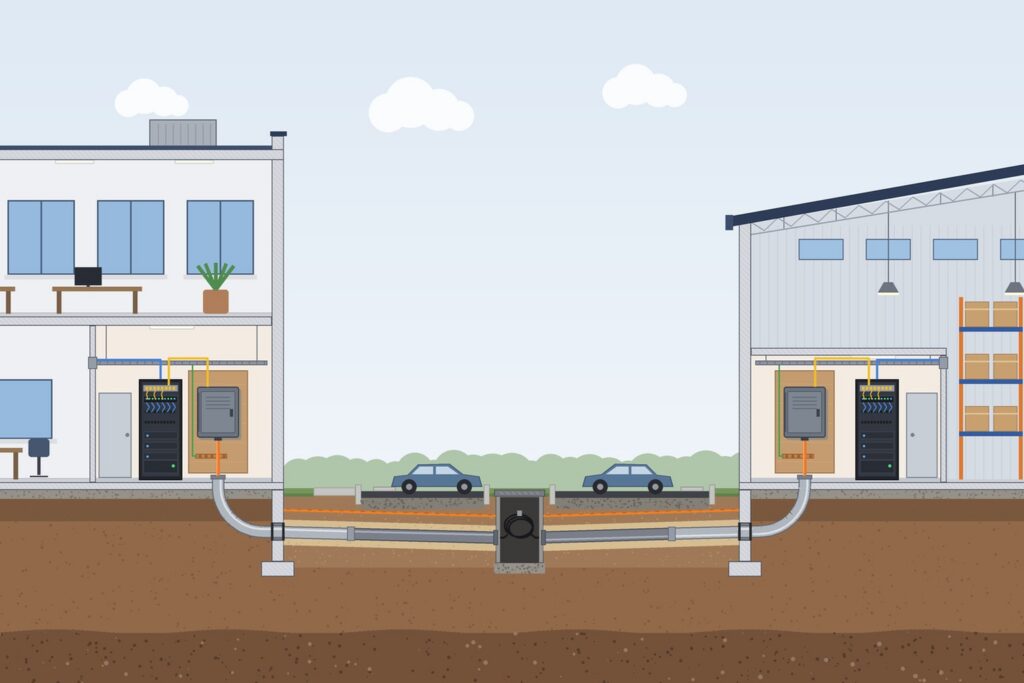
Why Fiber Between Buildings Beats Ethernet Cable
Standard copper Ethernet (Cat5e, Cat6, Cat6A) is designed for a channel of up to 100 meters, about 328 feet, including patch cords. Many building-to-building runs are longer than that once you follow the actual path around a lot, along a wall and up into a network closet.
Distance isn’t the only issue. A copper cable between two buildings connects two separate electrical systems with metal. Differences in ground potential between buildings, and nearby lightning strikes, can push current down that cable and into the switches on each end.
Glass fiber doesn’t conduct electricity, so a nonconductive fiber cable has no metallic path between the buildings at all.
Fiber also leaves room to grow. On single-mode fiber, the same strands that carry 1 Gbps today can carry 10 Gbps later by swapping the optics in the switches, without pulling new cable. Multimode can make the same jump only if the grade (OM3 or OM4) and the run length fall within the faster optic’s reach.
Pick the Route First
The route drives most of the cost and schedule of running fiber between buildings, so settle it before choosing cable.
- Underground conduit is the most common approach and the most protected. If conduit already exists between the buildings, find out whether it’s open, how full it is, and whether it holds water.
- New underground conduit means trenching or boring. In Maryland, any excavation needs a Miss Utility (811) ticket first. Maryland law requires a start date at least three business days, and no more than 12 business days, after the ticket is placed, and work shouldn’t begin until every notified utility has responded. Delaware, Virginia and DC set their own notice periods, so check the rules where the site is.
- Private lines on your own property, such as parking lot lighting or irrigation, may not be marked by the utilities, so plan to locate those separately.
- Aerial runs between buildings or poles are possible, but the cable has to be rated for aerial use and lashed or supported correctly. Some cable types are not suitable for aerial installation.
- Exterior wall runs along a shared wall or between attached structures still need outdoor-rated cable and protection where people or vehicles could hit it.
Also look at where the cable will enter each building and where it ends up. The best route outside is no help if it lands on the wrong side of a building, far from the network closet.
Choose Cable Built for Outdoors
Indoor fiber cable will not hold up in a conduit that floods or freezes. Outdoor and indoor/outdoor cables are built differently:
- Water blocking: outside plant cable uses gel or dry water-blocking materials to keep moisture from traveling along the cable. Loose-tube outside plant cable is the usual choice for underground conduit that may hold water or freeze.
- Armor: corrugated steel or interlocking aluminum armor adds crush and rodent resistance. It’s common where the pathway isn’t fully enclosed or where conduit may be damaged later.
- A UV-resistant jacket for any portion exposed to sunlight.
The Fiber Optic Association’s guide to outside plant fiber installation is a good, vendor-neutral reference if you want more detail on cable types and pulling practices.
Know the 50-foot rule
The National Electrical Code (NFPA 70) lets unlisted outside plant fiber cable run no more than 50 feet (15 m) inside a building, measured from its point of entrance. It also has to terminate in an enclosure and can’t pass through risers, plenums or other air-handling spaces. In the 2023 and earlier editions this is Section 770.48. The 2026 edition moved it to Section 800.48 without changing the 50-foot limit.
The code also lets the point of entrance be extended by keeping the cable in rigid or intermediate metal conduit all the way in, and in some spaces nonconductive cable can use PVC or EMT instead. Maryland counties and cities adopt and enforce NEC editions on their own schedules, so for fiber between buildings the local inspector has the final word.
That’s why many jobs that run fiber between buildings include a wall-mounted splice enclosure just inside the entrance, where the outdoor cable is spliced to listed indoor cable. The other option is an indoor/outdoor cable that carries the fire rating needed for the indoor spaces it passes through, which can run straight to the closet.
If you use armored or other conductive cable, the NEC requires its metallic members to be bonded or grounded as close as practical to where the cable enters the building, or interrupted with an insulating joint, where the cable could contact power conductors. (In the 2023 and earlier editions that rule is Section 770.93.)
Many installers bond the armor at each building entrance as standard practice when running armored fiber between buildings. Your contractor should account for this in the plan.
Fiber Type and Strand Count
Single-mode fiber (OS2) is the most common choice between buildings, because it handles longer distances and higher future speeds than multimode. Cabling standards allow either type, and multimode (OM3 or OM4) can work for shorter runs, but if there’s any doubt, single-mode is the safer long-term choice. Our post on singlemode vs multimode fiber covers the trade-offs in more detail.
For strand count on fiber between buildings, think past today. A link between two switches uses two strands. Spares let you add a second link for redundancy, separate a camera system, or recover from a damaged strand without another pull.
The labor to trench and pull is usually the largest part of the job, so adding strands while the work is underway tends to cost far less than coming back later. Not every spare strand has to be terminated on day one.
Terminating the Ends
Each end of the fiber between buildings lands in a fiber enclosure or patch panel in the network closet. A common method is fusion splicing: factory-made connectorized pigtails are fused to each strand with a splicing machine, and the splices sit protected in a tray inside the enclosure.
Fusion splices have very low loss, and industry standards allow up to 0.3 dB per splice when calculating a link’s loss budget.
From the patch panel, short fiber patch cords connect to the switch optics (SFP modules) on each side. The patch cords and optics must match the fiber type: single-mode optics with single-mode fiber, multimode with multimode.
Testing Fiber Between Buildings Before You Sign Off
A fiber link that “lights up” isn’t the same as a link that was tested. Ask for loss testing on every terminated strand.
The standard approach uses a calibrated light source on one end and an optical power meter on the other. The meter measures how much light made it through, and that loss is compared to a loss budget built from the cable length, the number of connector pairs and the number of splices.
Industry standards (TIA-568) allow up to 0.75 dB per mated connector pair and 0.3 dB per splice, plus a per-kilometer allowance for the fiber itself. Single-mode links are tested at 1310 and 1550 nm, multimode at 850 and 1300 nm. The FOA explains the math step by step in its page on calculating fiber optic loss budgets.
You should receive written results for each strand, along with the cable length (from the jacket footage markings or the as-built drawing) and confirmation that polarity was checked. Keep those results. If the link fails later, they give the next technician a baseline to compare against.
Label and Document It
Fiber between buildings is easy to forget about once it works, which is exactly why it needs good records. Label both ends of the cable, both enclosures and every strand position so someone opening the panel in five years knows what goes where. Record the route, entrance points and any pull boxes on a simple site drawing. Our post on how to label network cables has a practical scheme you can follow.
When to Call a Contractor
Bring in a contractor for fiber between buildings when:
- The run leaves the building, goes underground, or crosses a parking lot or driveway.
- You need new conduit, boring or trenching, or a building penetration.
- The cable needs fusion splicing, an entrance enclosure or a transition to indoor cable.
- You need tested, documented results for a landlord, insurer or IT team.
- An existing link between buildings has started dropping or went dark after construction nearby. Our service and maintenance team handles troubleshooting and repair.
A good contractor will walk both buildings, confirm the route and the closet locations, and tell you up front what testing and documentation you’ll receive.
FAQ: Running Fiber Between Buildings
How far can you run fiber between buildings?
Much farther than most business sites need. Standard single-mode optics are commonly rated to about 10 km, and multimode at 1 Gbps typically reaches about 220 to 550 meters, depending on the fiber grade. At 10 Gbps, multimode drops to about 300 meters on OM3 and 400 meters on OM4. For most properties, distance is not the limit. The route, the number of splices and connectors, and the optics you choose matter more.
Can we reuse existing conduit for fiber between buildings?
Often, yes. A contractor will check whether the conduit is continuous, how full it is and whether it has collapsed or filled with water. If it’s usable, a new cable can sometimes be pulled with the existing pull string or by adding innerduct. If it’s crushed or packed with old cable, a new path may cost less than fighting the old one.
What drives the cost of fiber between buildings?
Mostly the pathway. Trenching or boring, surface restoration, building penetrations and the length of the run usually outweigh the cost of the cable itself. Strand count, armor, splice enclosures and the number of strands that get terminated and tested on day one also play a part. Reusing good conduit is the biggest single saving.
Is a wireless bridge a good alternative?
A point-to-point wireless bridge can work when trenching isn’t possible or as a temporary link. It needs clear line of sight, it can be affected by weather and new obstructions, and its capacity is lower than fiber. For a building you plan to use for years, fiber between buildings is the more dependable link, and a wireless bridge can serve as a backup.
How long does the job take?
The cable work itself is often a short project once the route is ready. The schedule usually depends on the steps around it: the Miss Utility ticket and waiting period, any boring or trenching, permits or landlord approval, and lead time on outdoor cable and enclosures.
Getting Started
Chain designs, installs, fusion splices and tests fiber between buildings for businesses across Maryland and the rest of our Mid-Atlantic service area, and we connect them to the switches and WiFi on each side. See our structured cabling and fiber services and business networking and WiFi, or contact us to plan your link.