
A WiFi site survey is the step that tells you how your building will treat a wireless signal before you buy, mount or move a single access point. Dead spots, dropped calls and slow WiFi in one corner of an office are usually design problems, not internet problems.
A WiFi site survey finds out why, so the fix is planned instead of guessed. This guide explains the types of surveys, what each one looks at and what a business should get at the end.
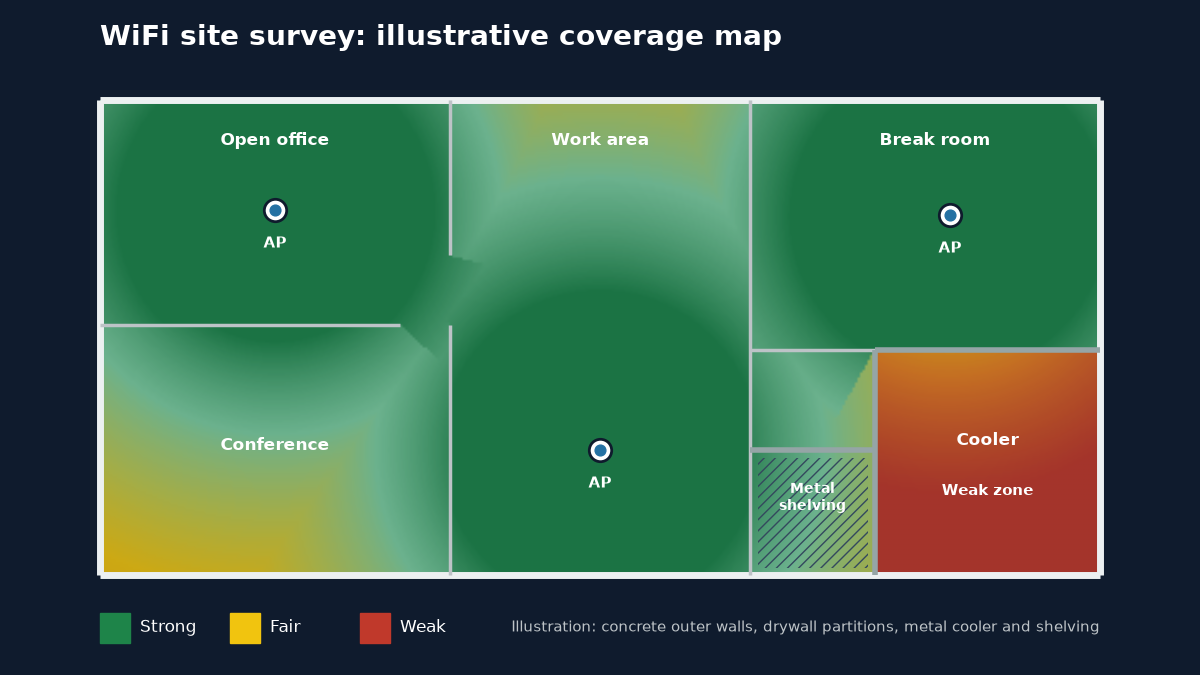
What a WiFi Site Survey Is (and Is Not)
A WiFi site survey measures or models how radio signals from access points (APs) spread through a specific space. It looks at signal strength, the noise and interference around it, which channels nearby networks are using, and whether the design can carry the number of devices that will connect in each area. The result is a plan for where APs go, which channels and power levels they use and what cabling they need.
A survey is not a speed test. A phone app that shows full bars or a fast download near the router says little about the back room, the conference room at 9 a.m. or the far end of a warehouse aisle. Internet speed and WiFi coverage are separate questions. Our guide to troubleshooting network dead zones covers how to tell them apart.
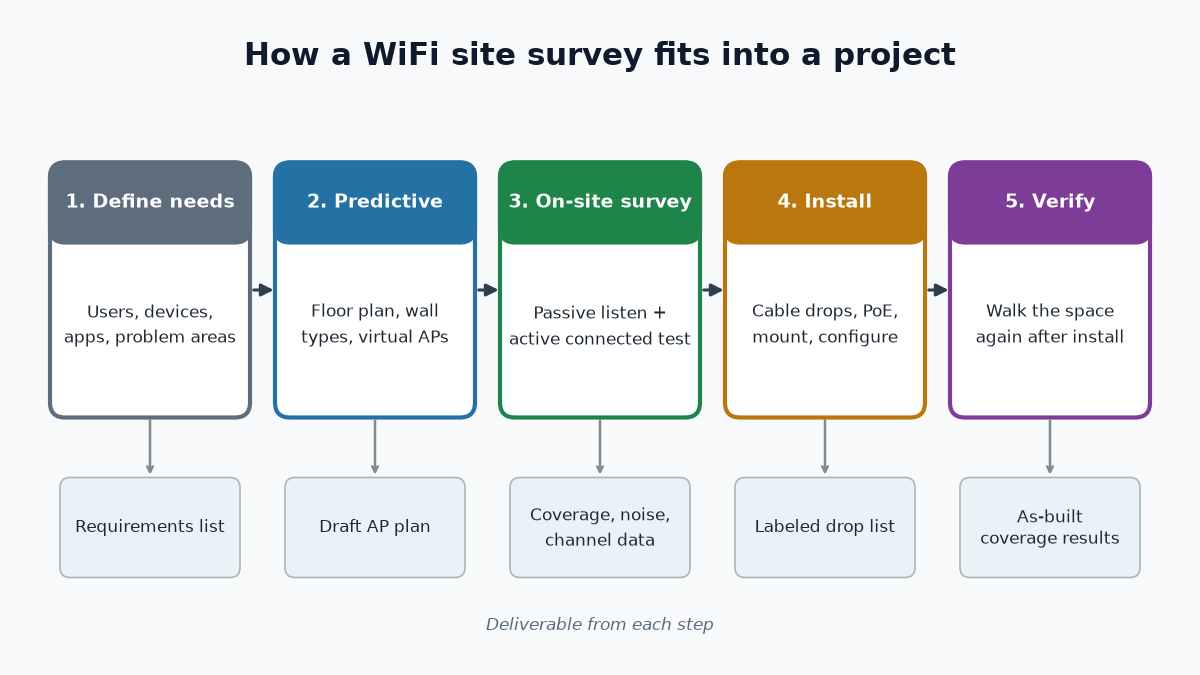
Predictive, On-Site and Post-Install Surveys
Surveys come in a few types. Each answers a different question, and many projects use more than one.
Predictive survey
A predictive survey is a model built from a floor plan. The designer marks wall types, doors, glass and large objects, then places virtual APs and lets the software estimate coverage.
Equipment makers’ design guides describe a predictive WiFi site survey as the right fit when the space has not been built yet or when you need a hardware budget early. The model is only as good as the floor plan and the materials entered, so it is a starting point, not proof.
On-site survey: passive and active
An on-site survey measures the real building. In a passive survey, a technician walks the space with a survey device that listens without connecting, recording signal strength, noise and every network in range, including your neighbors’. In an active survey, the device connects to the network and sends traffic, so it can measure data rates, retries and roaming between APs. Passive shows what the air looks like. Active shows what a connected device actually experiences.
Post-install verification
After the APs are mounted and configured, a final walk confirms the design delivered what it promised. This is where problems like a mislabeled AP, a channel conflict or a weak spot behind a new shelving unit show up. Without this step, the first person to find a gap is usually an employee.
What the Survey Looks At
Building materials and layout
Different materials weaken a signal by different amounts. Published vendor reference figures put drywall at around 3 dB of loss, brick around 10 dB and concrete around 12 dB, and the real figure depends on thickness, moisture and metal content.
Metal shelving, elevators, walk-in coolers, fire doors and coated low-emissivity window glass can block or reflect signal far more. Higher frequencies generally lose more through the same wall, so 5 GHz and 6 GHz coverage drops faster than 2.4 GHz.
Devices, density and applications
Coverage is only half the job. A WiFi site survey should also account for how many devices connect in each area and what they run. Voice calls, video meetings and handheld scanners are less forgiving than email.
For voice over WiFi, common vendor design guidance uses a cell edge of about -67 dBm with a signal-to-noise ratio of at least 25 dB, and many designers use similar targets for real-time apps. Our guide to office WiFi capacity planning goes deeper on counting users and devices.
Channels and neighboring networks
In the United States, the 2.4 GHz band has only three channels that do not overlap: 1, 6 and 11. The 5 GHz band has many more, and the 6 GHz band, opened by the FCC for unlicensed use in 2020, adds up to 1,200 MHz more for devices that support WiFi 6E or WiFi 7.
A WiFi site survey records which channels nearby networks already occupy, so your APs are not stacked on the same ones. In a multi-tenant building, this is often the reason WiFi is fine at night and poor at noon.
Mounting, cabling and power
Every AP location also has to be reachable with cable. Business APs usually connect with Ethernet, which is limited to a 100 meter channel, and get power from the switch through Power over Ethernet (PoE).
PoE+ (IEEE 802.3at) delivers up to 25.5 W at the device, and 802.3bt raises that to 51 W or 71.3 W. Newer APs may need PoE+ or more and a multi-gigabit port to run at full capability. A good survey ties each AP location to a cable path and a switch port.
When a Business WiFi Site Survey Is Worth Doing
Not every small space needs a formal WiFi site survey. A single-room office with a handful of users may be fine with one well-placed AP. A survey earns its keep when the cost of getting it wrong is higher than the survey itself. Common reasons include:
- Moving into a new space, a remodel or a tenant fit-out, before ceilings close and cable is pulled.
- Persistent dead spots or dropped calls that adding a range extender has not fixed.
- Adding handheld scanners, tablets at the register or WiFi phones that need steady roaming.
- Replacing or upgrading APs, including a move to WiFi 6E or WiFi 7, where 6 GHz coverage behaves differently.
- Multi-floor buildings, warehouses, coolers or long aisles of metal racking.
- Restaurants and retail floors with kitchens, back rooms and patios.
What You Should Get at the End of a WiFi Site Survey
The value of a survey is in what it leaves behind. Before you agree to one, ask what the deliverables will be. A useful package usually includes:
- An AP location plan marked on the floor plan, with mounting height and type (ceiling, wall or enclosure).
- Coverage maps for each band, showing signal strength and, for on-site work, noise and signal-to-noise ratio.
- A channel and power plan that accounts for neighboring networks.
- A cabling drop list showing which AP connects to which closet, patch panel port and switch port.
- Notes on problem areas, such as coolers, stairwells or metal storage, and how the design handles them.
- A post-install verification that compares the finished network to the plan.
If the cabling is part of the job, the labels on each drop should match the drop list, so the next service call starts with an accurate map instead of a guess.
From Survey Results to Access Point Placement
The results of a WiFi site survey turn into decisions about where APs mount and how they are set up. Often that means fewer, better-placed APs at lower power rather than more APs turned up high, which can make interference worse. It may mean an AP inside a cooler-lined storage area instead of one trying to shoot through it. Our guide to wireless access point placement covers mounting choices in detail.
The survey also shapes the wired side. Every AP needs a cable run, a PoE port and an uplink with enough capacity. In larger buildings, the closets that feed those APs may be linked by fiber. That is covered on our structured cabling and fiber optic installation pages.
Questions to Ask Before You Book a Survey
- Is this a predictive model, an on-site measurement or both?
- Will the survey cover every band the new APs will use, including 6 GHz if you are upgrading?
- Which devices and applications is the design built around, such as phones, scanners or video calls?
- Will someone repeat the WiFi site survey after installation, and will you get the results?
- Does the plan include the cabling and switch ports for each AP, or only the AP locations?
- Who installs the drops and mounts the APs, and who do you call if a spot is still weak?
FAQ: WiFi Site Survey
Does a small office need a WiFi site survey?
Not always. A small, open office with a few users can often be covered by one or two APs placed with care. A survey becomes worth it when there are multiple rooms, heavy walls, voice or video over WiFi, or recurring complaints that simple fixes have not solved.
Can a survey fix WiFi without buying new access points?
Sometimes. A WiFi site survey may show that the existing APs are poorly placed, set to overlapping channels or turned up too high. Moving them, changing channels or adjusting power can help. If the APs are old or the cabling cannot reach the right spots, the survey will show that too.
How long does a WiFi site survey take?
It depends on the size of the space, the number of floors, how many bands are measured and whether the survey is predictive, on-site or both. A predictive model needs an accurate floor plan first. An on-site survey needs access to every area, including back rooms and storage.
Is a predictive survey enough?
For a space that has not been built yet, a predictive model is often the only option and a reasonable start. Once the space exists, an on-site check confirms the real materials, furniture and neighboring networks match the model. Most designs benefit from a post-install verification either way.
Does a survey cover outdoor areas?
It can, if you ask for it. Patios, loading docks and yards need outdoor-rated APs and their own coverage plan. Keep in mind that low-power indoor 6 GHz APs are limited to indoor use under FCC rules, so outdoor coverage is planned on other bands or with equipment approved for outdoor use.
Plan Your WiFi With Chain
Chain designs and installs business networks and WiFi across the Mid-Atlantic. We walk the site, check coverage and the existing equipment, plan AP locations along with the cabling and switch ports behind them, then install, configure and check coverage again before we leave. See our networking and WiFi services, check whether you are in our service area, or contact us to plan a WiFi site survey for your space.