
A good restaurant network setup keeps registers, cameras and guest WiFi apart, even though they all share one internet connection. A restaurant or store runs a lot on that connection: registers, card readers, kitchen display screens, receipt and ticket printers, online ordering tablets, security cameras, music, the manager’s PC, and free WiFi for customers.
When all of that shares one flat network, a single problem device or a busy guest network can slow down the registers, and a customer’s phone sits on the same network as your payment systems.
This guide covers how to lay out a restaurant or retail network so each group of devices has its own lane, and how to repeat that layout across multiple locations.
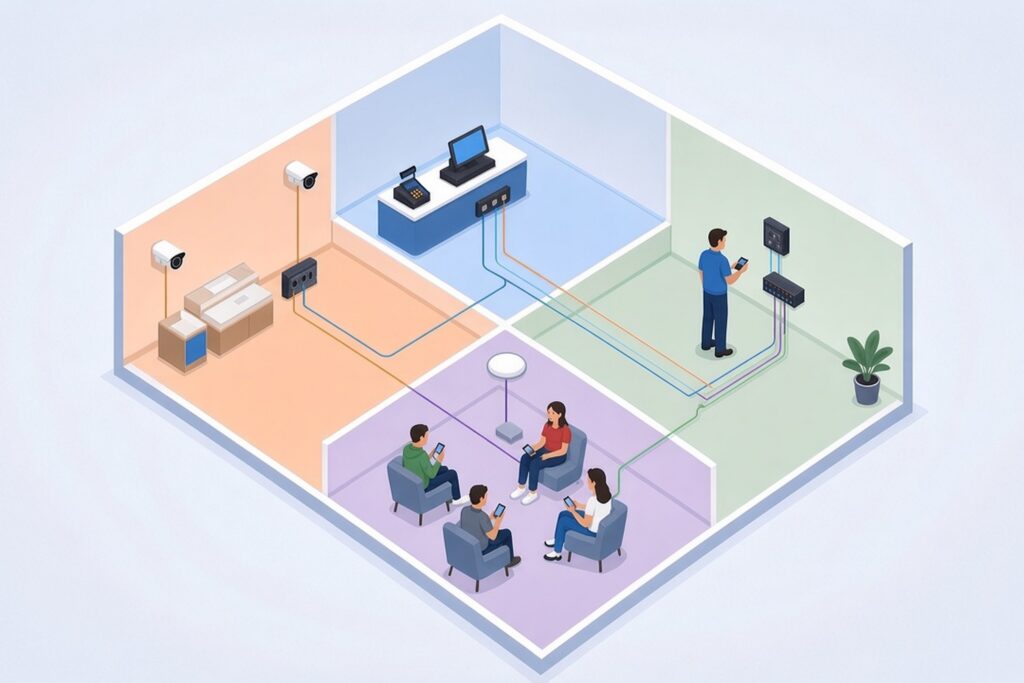
Why a Flat Network Causes Trouble
Most small stores start with whatever the internet provider installed: one router, one WiFi name, every device plugged into whatever port is open. It works until it doesn’t.
- Guest WiFi traffic competes with the registers for the same bandwidth.
- A malware-infected office PC or guest device can see and reach payment devices.
- Troubleshooting is slow because nobody can tell which device belongs to what.
- Every device on the network may be pulled into your payment card compliance scope.
Separating the network into segments fixes most of this.
The Usual Segments in a Restaurant Network Setup
Point-of-sale vendors and network equipment makers recommend similar layouts. A typical restaurant network setup has these segments, each usually set up as its own VLAN, and a retail store looks almost the same:
- POS: registers, kitchen display systems, receipt and ticket printers and local POS services.
- Payment: PIN pads and payment devices, where your POS vendor or payment processor wants them separated from the registers.
- Office: back-office PCs and managers’ laptops, with access only to the POS admin tools they actually need.
- Cameras and building devices: security cameras, the NVR, music systems, digital signage and sensors.
- Guest WiFi: customer devices, with internet access only.
- Management: the firewall, switches and access points themselves, reachable only by whoever administers them.
Not every location needs all six. A small café might combine office and POS if the POS vendor allows it. But guest WiFi and cameras should almost always be separate from registers and payment devices.
VLANs Are Only Half the Job
A VLAN splits one physical switch into several logical networks. By itself, a VLAN doesn’t decide what can talk to what. PCI DSS describes segmentation as something done with properly configured firewalls, routers with strong access control lists or similar controls that actually restrict traffic. A VLAN with nothing filtering between segments doesn’t meet that bar. The rules that block or allow traffic between segments live in the firewall.
The safe pattern is default deny: nothing crosses from one segment to another unless you’ve written a rule for a specific reason. For example, the office PC may need to reach the POS back-office server on one port.
Guest WiFi should reach the internet and nothing else. Cameras should reach the NVR and the remote viewing service, not the registers.
Write those allowed connections down. If you ever need to explain your restaurant network setup to a payment processor or compliance assessor, a short list of what talks to what, and why, saves a lot of time.
Guest WiFi Done Right
Guest WiFi is where most restaurant network setup problems show up first. A few settings make a big difference:
- Put guest WiFi on its own SSID and segment with internet-only access.
- Turn on client isolation so guest devices can’t see each other.
- Apply a bandwidth limit per device or for the whole guest network so a few streaming phones can’t crowd out the business.
- Use a separate, encrypted staff SSID for handheld POS devices, tablets and scanners. Never put handheld payment devices on the guest network.
PCI DSS version 4.0 requires a firewall or similar network security control between every wireless network and the systems that handle card data, whether or not that wireless network handles payments. Wireless traffic into the card data environment has to be denied by default, with only traffic that has a business reason allowed through.
If handheld card readers or tablets take payments over WiFi, that wireless network is usually part of the card data environment and needs strong encryption and controlled access. Some processors use validated point-to-point encryption (P2PE) that changes how much of the network is in scope, so ask yours how its devices are treated.
Payment Card Compliance, Briefly
PCI DSS does not strictly require network segmentation. But without it, every device on a flat network can fall into the scope of your assessment. Separating the card data environment from everything else is the standard way to shrink that scope and lower risk. Merchants that rely on segmentation to reduce scope have to test it at least once every 12 months and after any change to the segmentation controls.
The PCI Security Standards Council publishes plain-language guides for small businesses on its merchant resources page, and the full standard is in its document library.
Your payment processor, POS vendor or qualified assessor decides what’s in scope for your business. A network contractor’s job is to build the segments and firewall rules they ask for and document the restaurant network setup clearly.
Cameras on Their Own Segment
In a restaurant network setup, cameras are usually the heaviest steady traffic. They send video around the clock. Putting them on their own segment keeps that traffic away from the registers and limits the damage if a camera’s firmware has a security flaw. The NVR sits on the camera segment, and remote viewing goes through a controlled path rather than opening the whole network to the internet.
Most IP cameras are powered over Ethernet, so the switch needs enough PoE capacity for every camera plus access points. Our post on PoE vs non-PoE switches explains how to size this. For camera layout and recording, see our security camera services.
Plan for Internet Outages
When the internet drops at a busy store, staff notice in seconds. Ask your POS vendor whether the registers can take payments offline and for how long.
Many stores add a second connection, often cellular, that the firewall switches to automatically. Keep the registers and payment devices on the backup path, and decide whether guest WiFi should run on it at all. A restaurant network setup that plans for the outage ahead of time keeps the line moving when it happens.
Wiring That Holds Up
WiFi is fine for guests and handhelds, but fixed devices like registers, printers, kitchen displays and cameras should be hardwired whenever possible. Kitchens are hot, greasy and busy, so cable runs there need protected pathways and devices mounted out of the way.
Bring every run back to one labeled closet or wall rack with a patch panel, so a manager can tell support exactly which port a device is on. Our structured cabling page covers how we build that.
Repeat the Restaurant Network Setup at Every Location
For businesses with multiple stores or restaurants, the biggest time saver is a standard template:
- The same VLAN numbers and names at every site.
- An IP address plan where the third octet identifies the store.
- The same SSID names, firewall rules and equipment models.
- The same labeling scheme and a one-page diagram for each site.
When every store gets the same restaurant network setup, a problem found at one site can be checked and fixed at all of them, new stores open faster, and anyone supporting the network knows where to look.
When to Call a Contractor
Bring in a networking contractor when:
- You’re opening a new location or remodeling an existing one.
- Your POS vendor or payment processor has asked for segmentation you don’t have.
- Guest WiFi complaints or slow registers keep coming back.
- You’re adding cameras, kitchen displays or online ordering and the network is already crowded.
- Your stores were each set up differently and nobody has a current diagram.
Before any work starts, also look for access points or routers installed by past vendors or fit-out crews. Unknown wireless equipment on your network is still your responsibility.
Restaurant Network Setup FAQ
Can I use the router my internet provider gave me?
For a single small location with a few devices, it may handle internet access. Most provider routers can’t create the separate segments, firewall rules and guest limits described above, though. A business firewall and a managed switch are the usual starting point for a restaurant network setup that keeps payments apart from everything else.
Should the registers be on WiFi or wired?
Wired, wherever the counter layout allows it. Fixed registers, kitchen displays and printers rarely move, and a cable removes a whole category of dropouts during a rush. Save WiFi for handheld order and payment devices, and give those their own encrypted staff network.
How much internet speed does a restaurant need?
It depends on online ordering, cameras viewed remotely and how many guests use the WiFi. Card transactions themselves use very little bandwidth. What matters more is that guest traffic is capped so it can’t crowd out the registers, and that a backup connection is in place for outages.
Does the same restaurant network setup work for retail stores?
Yes. A retail store swaps kitchen displays for handheld scanners and price checkers, but the segments are the same: POS, payment, office, cameras, guests and management. Many businesses use one template for both.
How often should the network be reviewed?
Look at it at least once a year, and any time you change POS systems, add a location, or add devices like kiosks or ordering tablets. Check the firewall rules, remove accounts for former staff and vendors, and update the site diagram.
Getting Started
Chain plans, wires and configures store and restaurant networks for businesses across Maryland and the Mid-Atlantic, from a single location to many. Whether you need a new restaurant network setup or a cleanup of an existing one, see our business networking and WiFi services, or contact us to talk through your locations.